What is the best AI contractor software for your jobs?
The answer depends on what work you want AI to handle. A residential GC coordinating draws and subs needs a different system from a field service team dispatching same-day calls.
The short answer
For residential GC operations, compare Opsite, Buildertrend, and JobTread on the same change, draw, sub, client update, and budget. If AI estimating or plan takeoffs are the main purchase reason, also test Houzz Pro and Eano Pro on a real set of plans; Opsite is not a standalone AI takeoff tool. Consider Procore for document-heavy commercial work or Jobber for service visits and dispatch.
“AI-powered” is too broad to make a buying decision. Ask each vendor to complete the same task using a sample job: turn a field update into a client summary, flag a missing subcontractor document, find an overdue draw, and show what happens before an AI action is sent. Check which features are available on the plan you would actually buy.
Is it AI, or is it a useful rule?
An AI assistant interprets a question or drafts an answer from connected job records. Scheduled automation follows configured conditions and timing. Both can save office work, but an automatic reminder is not proof that a model understands the invoice, the contract, or a dispute.
AI with job context
Opsite’s Lino assistant, listed on Professional, can work with connected records. In a demo, ask it to identify an overdue invoice, show the source record, and explain what it cannot verify.
Check the answer against the actual job and payment state.Rules-based follow-up
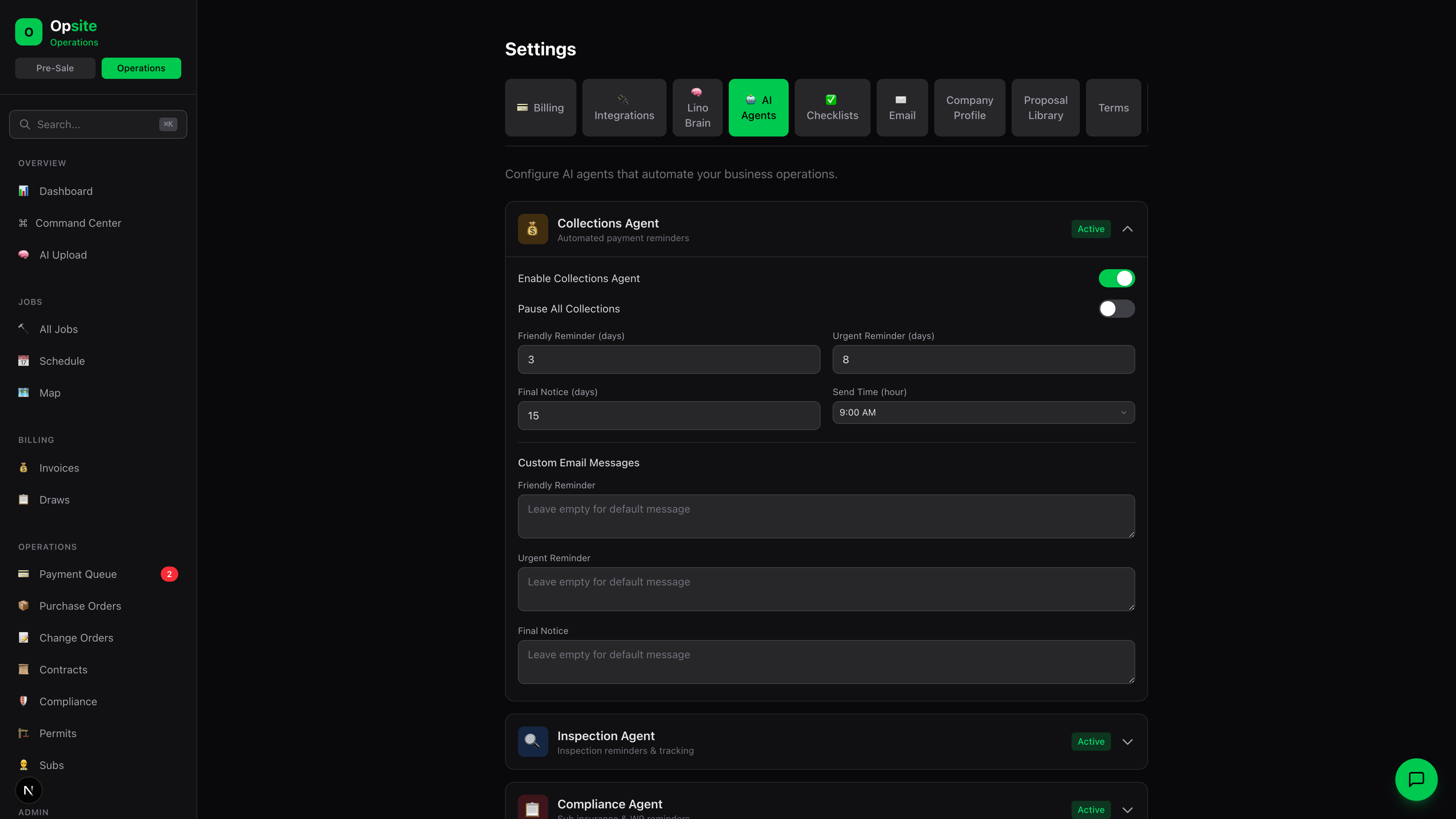
Opsite’s Collections Agent, listed on Enterprise, uses configured reminder timing and message content. It is scheduled automation, not AI-generated collection language or an autonomous payment decision.
Test pause controls, recipients, delivery history, and the paid or disputed case.Ask every vendor which step uses a model, which runs a rule, and which requires your approval. The Collections Agent demo test shows how to inspect that distinction in Opsite.
Find the demo test that fits your jobs
Choose your work and biggest bottleneck. This two-question guide gives you a starting shortlist and specific tasks to put in front of every vendor. You can still use the full comparison below.
This is a guide based on your two selections, not an independent ranking or a claim that every feature is included in an Opsite plan. Compare all seven platforms and verify the workflow with each vendor.
Seven credible platforms, different contractor jobs
This is a fit guide, not a numerical ranking. Product capabilities can change; the source links below go to each vendor’s current description.
Swipe the table to see each AI workflow and buying question.
| Platform | Best starting point for | AI workflow to see live | Buying question |
|---|---|---|---|
| Opsite | Residential GCs who want job financials, draws, subs, and client communication together. | Ask Lino about a job’s outstanding invoices; review automation around billing or compliance. | Is the workflow on Professional or Enterprise? Which steps require approval? |
| Buildertrend | Home builders and remodelers who want established residential project workflows. | Client updates, bill capture, or plan page naming. | Which AI capabilities are on your plan, and how much review is needed? |
| JobTread | Home builders and remodelers who prioritize estimating, job budgets, and connected project workflows. | Use its built-in AI to draft a budget, formula, or form; separately test its AI Connector if you need an external assistant. | How does the reviewed draft become an approved budget, and which AI features or connections are included in your plan? |
| Houzz Pro | Remodelers and design-build teams whose estimating, plan takeoffs, selections, and project planning are closely linked. | Create an estimate from a project description or plan, then review the AI-assisted estimate-to-schedule handoff. | Which quantities and line items need human correction, and which AI tools are in the quoted plan? |
| Eano Pro | Residential GCs and remodelers focused on turning plans and project files into estimates and schedules. | Run a plan takeoff and compare its quantities and estimate lines with the source sheets. | How are takeoff assumptions reviewed, and how do approved figures carry into job costs? |
| Procore | Commercial and larger project teams working across extensive specs, submittals, and contracts. | Cross-reference project files or draft a submittal review. | What data and setup are required for the agent to act accurately? |
| Jobber | Service and trade businesses focused on dispatch, visits, quotes, and client calls. | Use Jobber AI in the app to create a quote or invoice; assess its receptionist workflow. | Will service-focused workflows cover multi-phase construction jobs? |
Vendor sources: Opsite AI agents, Buildertrend AI, JobTread built-in AI and AI Connector, Houzz Pro AI documentation, Eano Pro AI construction software, Procore AI, and Jobber AI documentation. Reviewed September 28, 2026.
The shortlist and its limits
We chose seven products with vendor-published AI features relevant to contractor work. The mix covers residential and commercial job management, estimating and takeoffs, and field service so you can rule out the wrong category before comparing plans. It is a buyer shortlist, not a complete market survey or a ranked top seven.
What we checked
The capability links in the table above and the pricing links below lead to each vendor's own pages. We reviewed those published descriptions on September 28, 2026.
Features, packaging, and prices can change; confirm them in a current quote.What we have not tested
We have not run hands-on demos of the six competing products. A vendor's feature description does not establish accuracy on your plans or job data, time saved, or availability in the plan you would buy.
Ask each vendor to complete the same task using a representative job.Opsite publishes this guide and sells one of the products listed. Its own feature descriptions and product screen are first-party evidence, not independent test results. Use the free GC software scorecard to record your own demo results and written quotes for up to three vendors.
What does AI contractor software actually cost?
Public prices range from a base subscription plus user or AI charges to a custom annual quote. A low starting price does not mean the job, takeoff, or agent workflow you need is included. These are US vendor-published prices and models reviewed September 28, 2026; ask each provider for the cost of the same demo workflow, user count, onboarding, and data migration.
Swipe the table to compare plan and AI costs.
| Platform | Public price or quote model | AI and plan question |
|---|---|---|
| Opsite | Professional $649/month; Enterprise $999/month. | Lino is listed on Professional; AI agents and custom rules are listed on Enterprise. Ask which actions require approval. |
| Buildertrend | Custom quote; its pricing page lists unlimited users and projects. | Ask which AI workflows are available in the quoted package and what onboarding costs. |
| JobTread | $199/month base, with published tiered charges for additional internal users. | Confirm the built-in AI tools and any external AI Connector setup in your workflow. |
| Houzz Pro | Pro $249/month after a 30-day trial with an annual subscription; Custom is quote-only and lists takeoffs. | Ask whether the estimate, takeoff, and project workflow shown is in the plan you would buy. |
| Eano Pro | Pro $199/month on monthly billing; AI takeoffs are listed as an add-on with contact pricing. | Get the add-on price and confirm how approved takeoff quantities reach the job budget. |
| Procore | Custom annual fee by product and annual construction volume; its standard model lists unlimited users. | Confirm the AI products, project data, and implementation scope in the quote. |
| Jobber | Tiered service-business plans; its AI Receptionist is shown as a $29/month add-on. | Check the total for your team and whether service workflows cover multi-phase GC jobs. |
Prices and packaging can change. This compares published entry points, not equal bundles or a total-cost estimate. Use the free GC software scorecard to record each written quote and the demo evidence. If Opsite is on your shortlist, request a workflow fit review.
Six tests that matter more than an AI label
1. Does it know the job?
Ask a question about a real change order, invoice, or daily log. Make sure the answer points back to the correct record.
Connected job context beats a generic chatbot response.2. Can it finish useful work?
Have the vendor show one action end to end, including the review step, notification, and resulting record.
A polished draft is different from a completed workflow.3. Will your team use it?
Test from the office and the field. Include a PM and one subcontractor in the evaluation.
Adoption matters more than a long feature list.4. What is the real cost?
Compare the plan that includes the AI features you need, onboarding, integrations, and user limits.
Ask for the price in writing before choosing.5. Where is human approval?
Review permissions for client messages, financial changes, and subcontractor actions.
AI output still needs a responsible owner.6. Can you leave with your data?
Ask to export a sample project, contacts, documents, and transaction history.
Portability protects your operation as it grows.Want to compare demos on the same job? Use the free GC software scorecard →
The scorecard lets you record your own evidence for three vendors; Opsite does not supply the ratings.
What does automated invoice follow-up actually look like?
Here is one specific Opsite workflow to put under a microscope: overdue invoice reminders. The Collections Agent follows configured timing and message rules; it is not a generative AI writer. The screen below shows its on/off switch, pause control, reminder intervals, send time, and message fields. Test the resulting invoice and send record before treating the settings as proof of an outcome.
Run this test in the demo
- Choose a sample overdue invoice. Confirm the job, client, amount, due date, and current payment status before any reminder is considered.
- Set the rules. Ask the team to show the reminder timing, send time, custom message, and how to pause collections for a disputed invoice.
- Follow one reminder through. Have them show the actual recipient preview, whether an approval step exists, the send record, and what happens when the invoice is paid. The settings screen alone cannot establish these outcomes.
Plan check: The rules-based Collections Agent is listed with Enterprise automations. Lino, the AI assistant on Professional, is a different capability. Check current plan details.
One operating system for a GC’s day
Opsite combines job dashboards, draw tracking, invoicing, change orders, purchase orders, schedules, and client and subcontractor portals. Professional includes Lino, the AI assistant, alongside CRM and compliance tools. Enterprise adds AI agents and custom automations. See the platform features or check current plan details.
Opsite may be a poor fit if your main need is same-day service dispatch, a standalone AI takeoff tool, or an enterprise submittal system. If that sounds like your operation, use the comparison above to shortlist a better category first.
Questions contractors ask before a demo
Is AI contractor software the same as AI estimating software?
No. Estimating tools focus on takeoff, quantities, and bids. Contractor management platforms focus on running work after a lead or job exists: scheduling, costs, change orders, invoices, and communication. Some products cover both, but verify each workflow in a demo.
Which software should I test for AI estimating and takeoffs?
Compare JobTread’s AI budget tools, Houzz Pro’s estimating and takeoff features, and Eano Pro’s estimate and takeoff tools on the same plans. Verify quantities, assumptions, line items, and how an approved estimate enters the job budget. Opsite is not a standalone AI takeoff product.
Are automatic invoice reminders the same as AI?
No. Opsite’s scheduled Collections Agent follows timing and message rules configured by the contractor. Lino is a separate AI assistant that can work with connected job records. Ask to see the source invoice, pause controls, recipient, and send history for any reminder workflow. See the distinction.
Which Opsite plan includes AI?
Professional lists Lino, the AI assistant. Enterprise adds AI agents and custom automation rules. Starter covers core job management without those AI features. Check current pricing for plan details.
Can AI send a client update or change a financial record on its own?
Do not assume it can or should. Ask every vendor to show permissions, approval steps, and an audit trail for the exact action you want to automate.
Does JobTread have built-in AI?
Yes. JobTread says its Budget, Formula, and Forms Builders are built into the product. Its AI Connector is a separate path for using an external AI assistant with JobTread data. Read JobTread’s current description and check the exact feature and plan in a demo.
What should I bring to a software demo?
Bring one representative job, a recent change order, a subcontractor document, an unpaid invoice, and a daily field update. Ask the vendor to work through those examples rather than a canned tour.
See whether Opsite fits your operation.
Tell us what kind of projects you run and which workflow slows you down. We’ll use that to make the conversation specific to your business.
Prefer to pick a time now? Book a 30-minute workflow review. You can also start the guided intake.