Features Pricing Blog About FAQ Sign in Request a demo

One platform. Every tool a contractor needs.

From lead capture to final draw, Opsite handles it. Here's everything inside.

The complete construction operations stack

Eight integrated modules that replace your spreadsheets, disconnected apps, and manual processes.

Capture leads. Qualify them. Close more deals.

Your pipeline shouldn't be a mental list of people to call back. Opsite's CRM tracks every lead from first contact to signed contract — with AI scoring that tells you who's worth your time.

  • ✓ Centralized lead intake with source tracking and auto-timestamps
  • ✓ AI lead scoring (0-100) based on budget, timeline, and decision-maker status
  • ✓ 7-step pre-meeting questionnaire — know the budget before you walk in
  • ✓ Visual pipeline board: New → Contacted → Proposal Sent → Won
  • ✓ Opportunities pipeline with proposal linking and view tracking
  • ✓ AI meeting prep brief — talking points, priorities, decision-makers
  • ✓ Lead nurture agent — automated follow-ups for cold leads
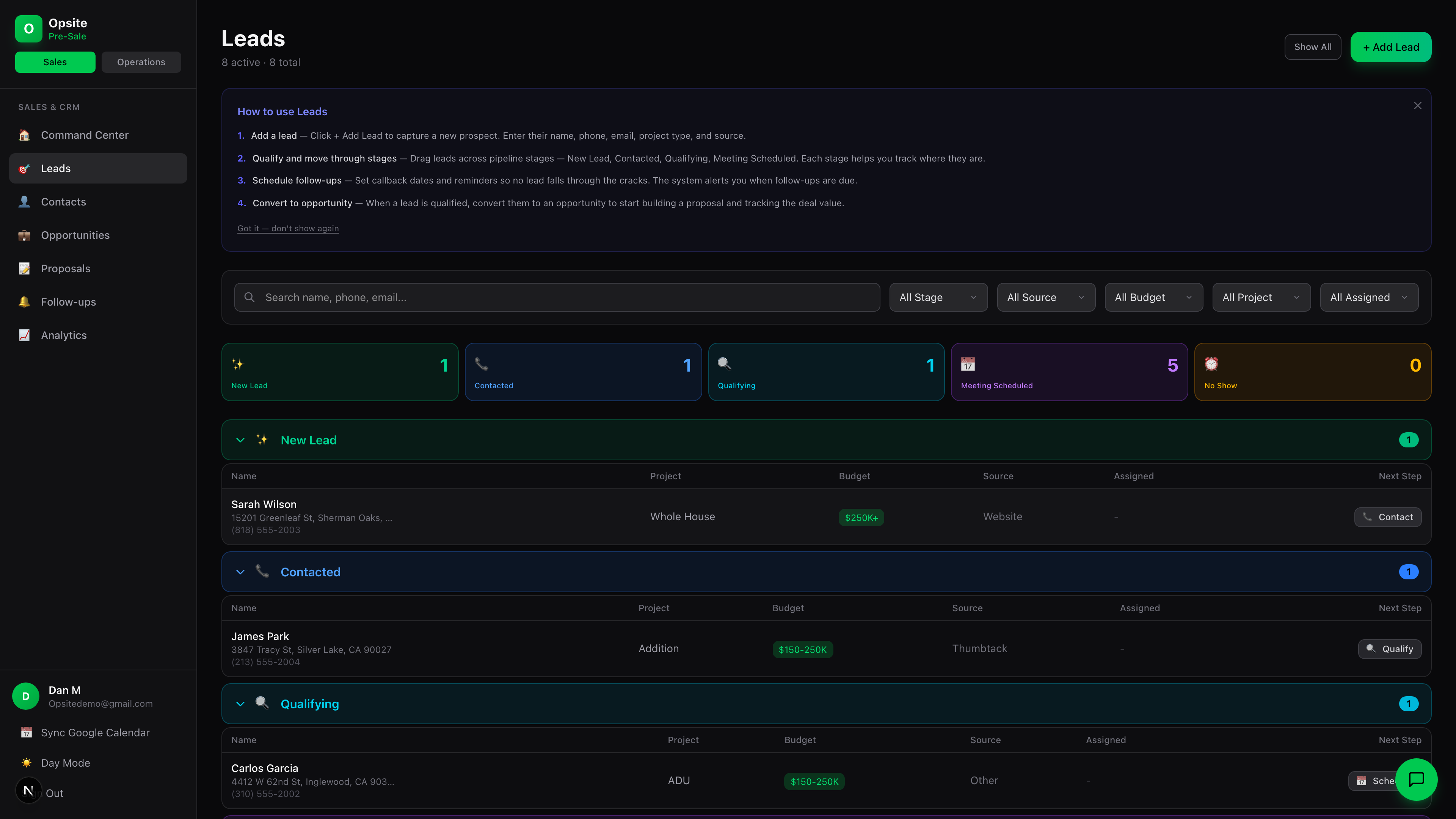
Opsite CRM lead pipeline

Build proposals that close. Not ones that collect dust.

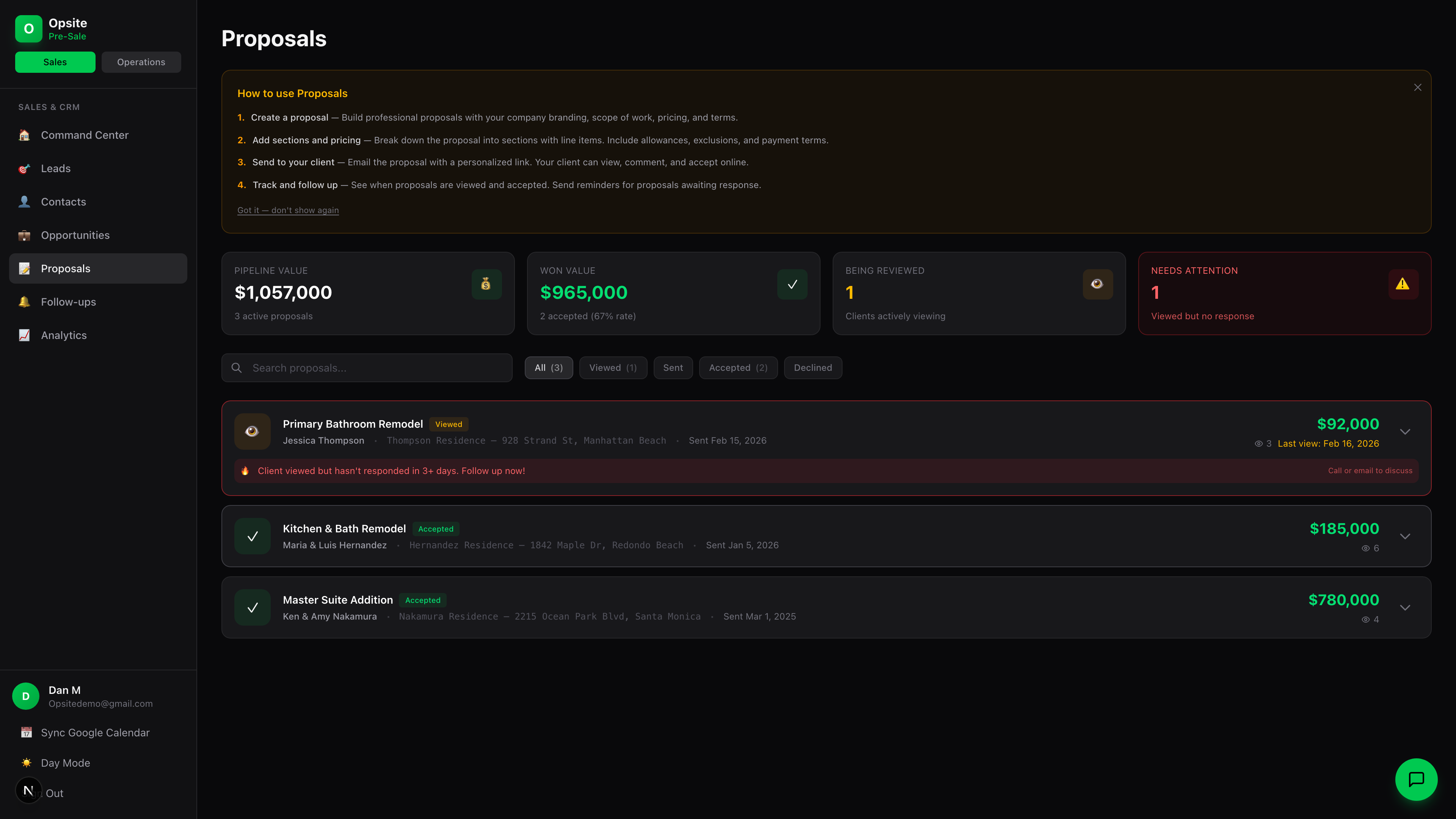
Stop emailing PDFs that go to spam. Opsite proposals are live web pages with view tracking, e-signatures, and stage payments built in. You'll know the second they open it.

  • ✓ Professional proposal builder with rich text, scope editor, and branding
  • ✓ Built-in e-signatures — client signs on their phone, no DocuSign needed
  • ✓ Real-time view tracking — sessions, time spent, last viewed
  • ✓ Stage payments — define deposit, milestones, and completion amounts
  • ✓ AI templates — Lino learns from your past proposals
  • ✓ Decline reason tracking — learn why you lost and adjust
  • ✓ One-click PDF generation with company branding
Opsite proposal builder

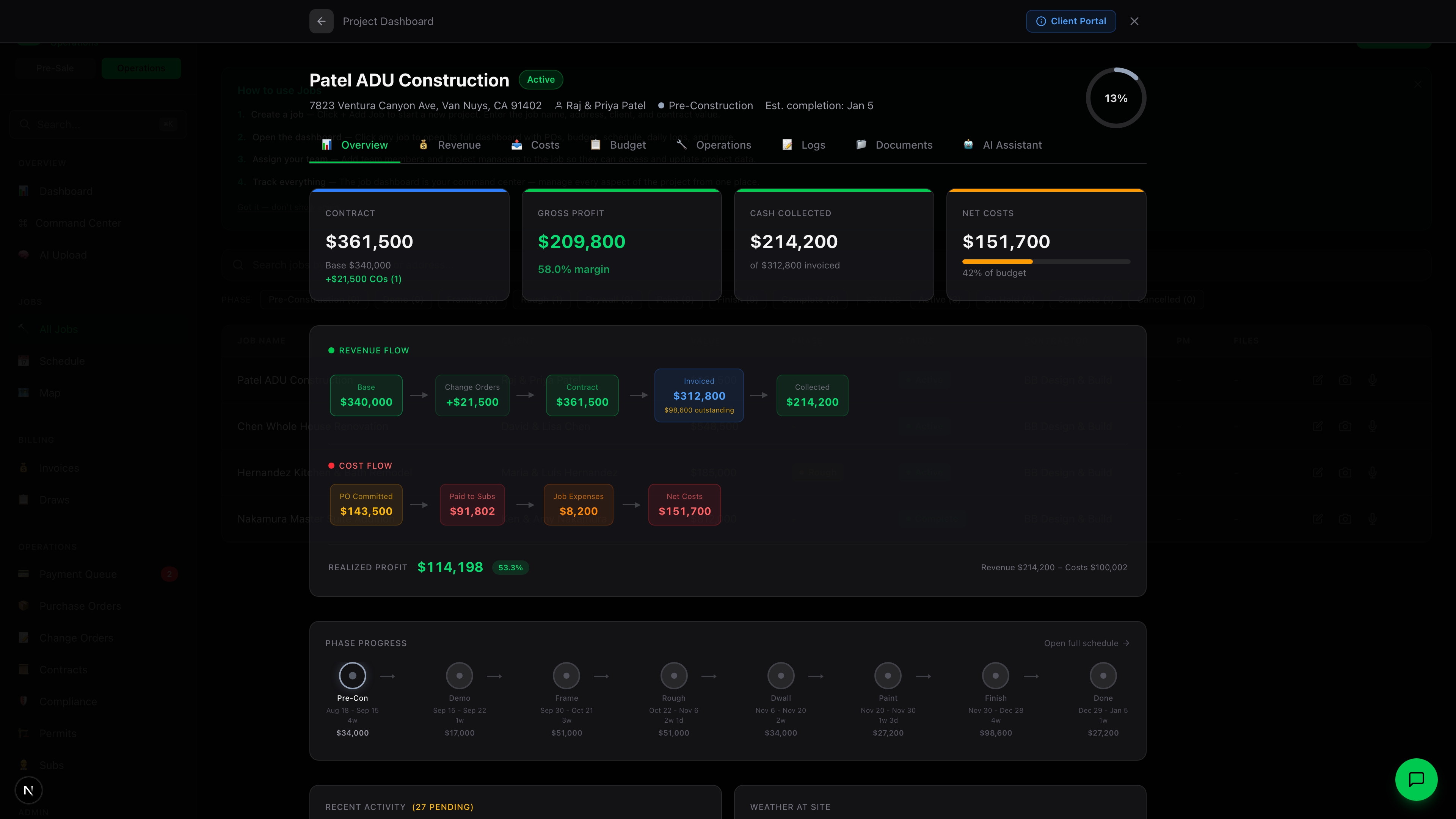
Everything about the job. One screen. Zero digging.

Your job info is spread across 7 apps. Opsite puts it all in one dashboard — financial summary, phase tracking, documents, inspections, and AI assistant. Every tab, every number, one screen.

  • ✓ Full-screen job dashboard with financial KPIs
  • ✓ 8-phase tracking: Pre-Con through Closeout with linked subtasks
  • ✓ Real-time profit margin — contract value, PO costs, expenses, back charges
  • ✓ AI document categorization — upload and it auto-files
  • ✓ Budget tab with cost code tracking and PO drilldown
  • ✓ Daily logs — voice recording, photo logs, AI-structured notes
  • ✓ Tabs: Overview, Income, Expenses, Operations, Documents, AI
Opsite job dashboard

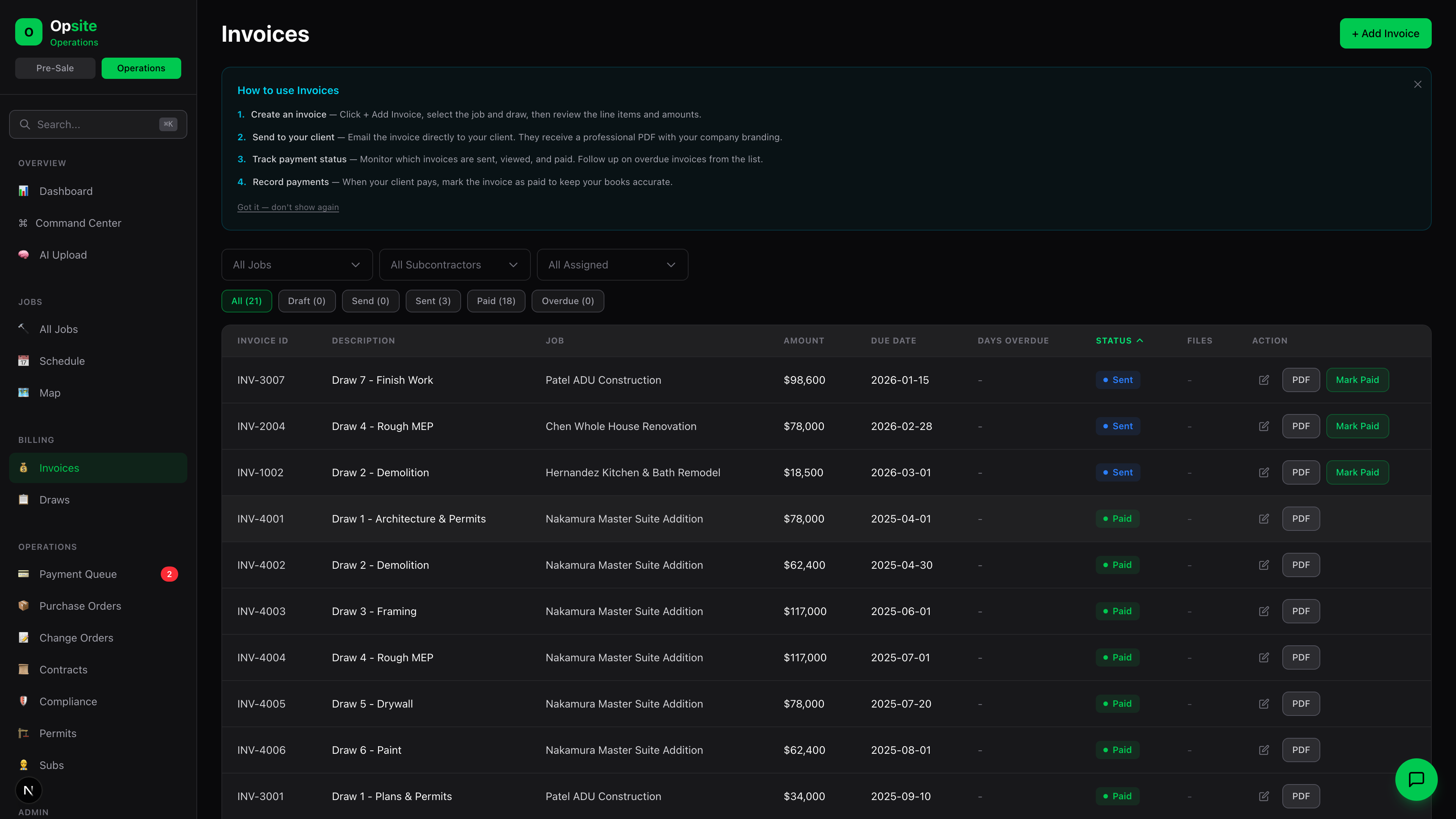
Trace a draw from inspection to invoice.

Use a sample job to check how inspection progress, the draw amount, invoice preparation, review, and client notification connect. Ask which steps require approval on your plan before anything is sent.

  • ✓ Draws linked to phases, inspections, and invoices
  • ✓ Inspection-to-draw billing workflow — verify preparation, PDF, approval, and send record
  • ✓ Collections Agent — configurable, rules-based reminder cadence
  • ✓ Payment links embedded in every invoice
  • ✓ Overdue invoice dashboard with color-coded urgency
  • ✓ QuickBooks sync — verify field mapping, status updates, and failure handling
  • ✓ Professional branded invoice PDFs — one click
Opsite invoicing and draws

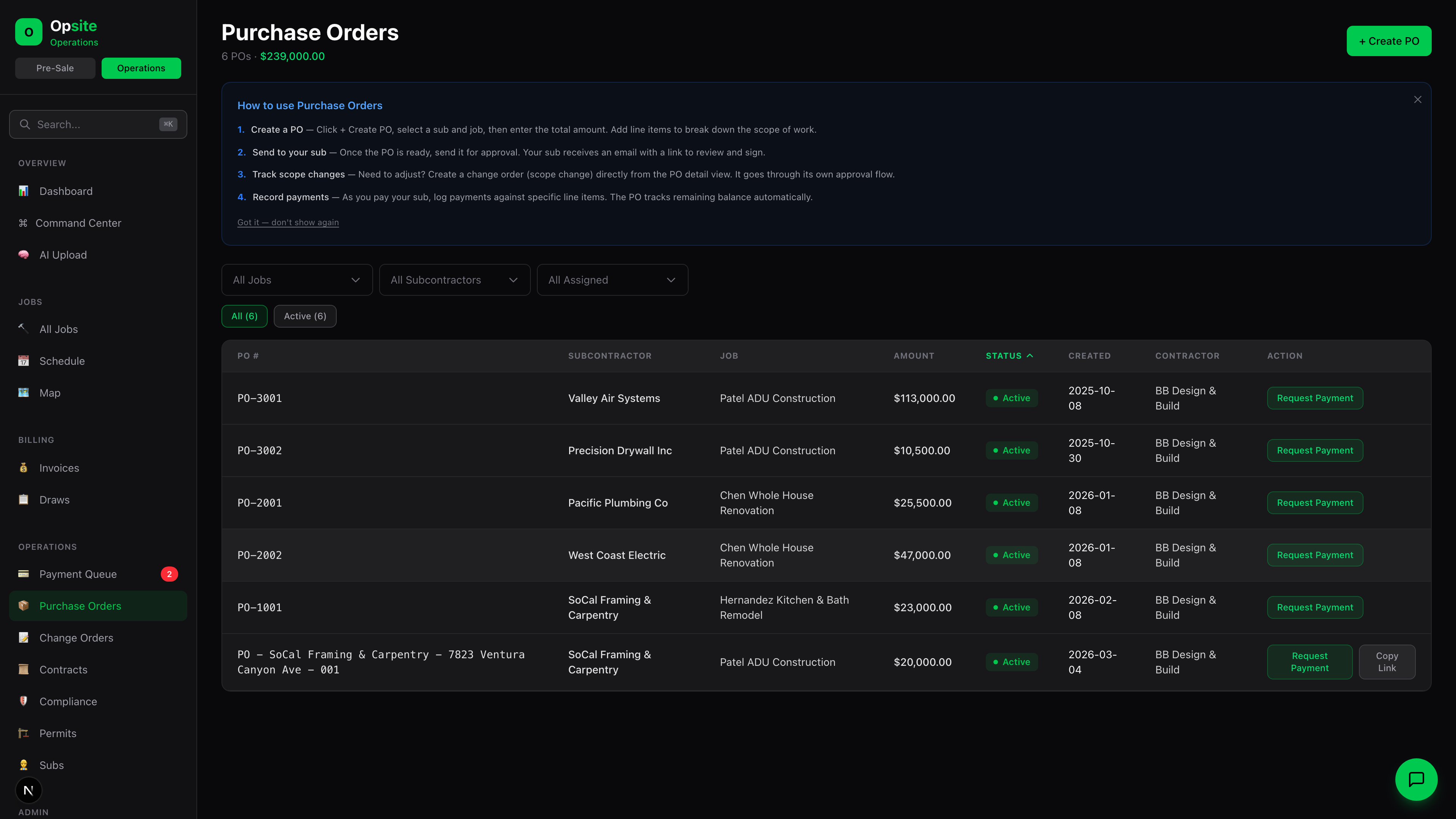
Every dollar to every sub. Documented and tracked.

No more thumbs-up POs or handshake agreements. Opsite tracks purchase orders, scope changes, sub payments, and expenses with full audit trails and digital signatures.

  • ✓ Purchase orders with 6 line item categories
  • ✓ Scope changes and amendments with sub e-signature via portal
  • ✓ Sub payment validation — lien waiver, insurance, license checks
  • ✓ Digital PO signatures — zero-login, timestamp and IP captured
  • ✓ Receipt tracking — photo or PDF, linked to job and category
  • ✓ Change orders with 6-status approval workflow and client e-sign
  • ✓ Back charges linked to POs for review and tracking
  • ✓ 8-category expense tracking per job
Opsite purchase orders

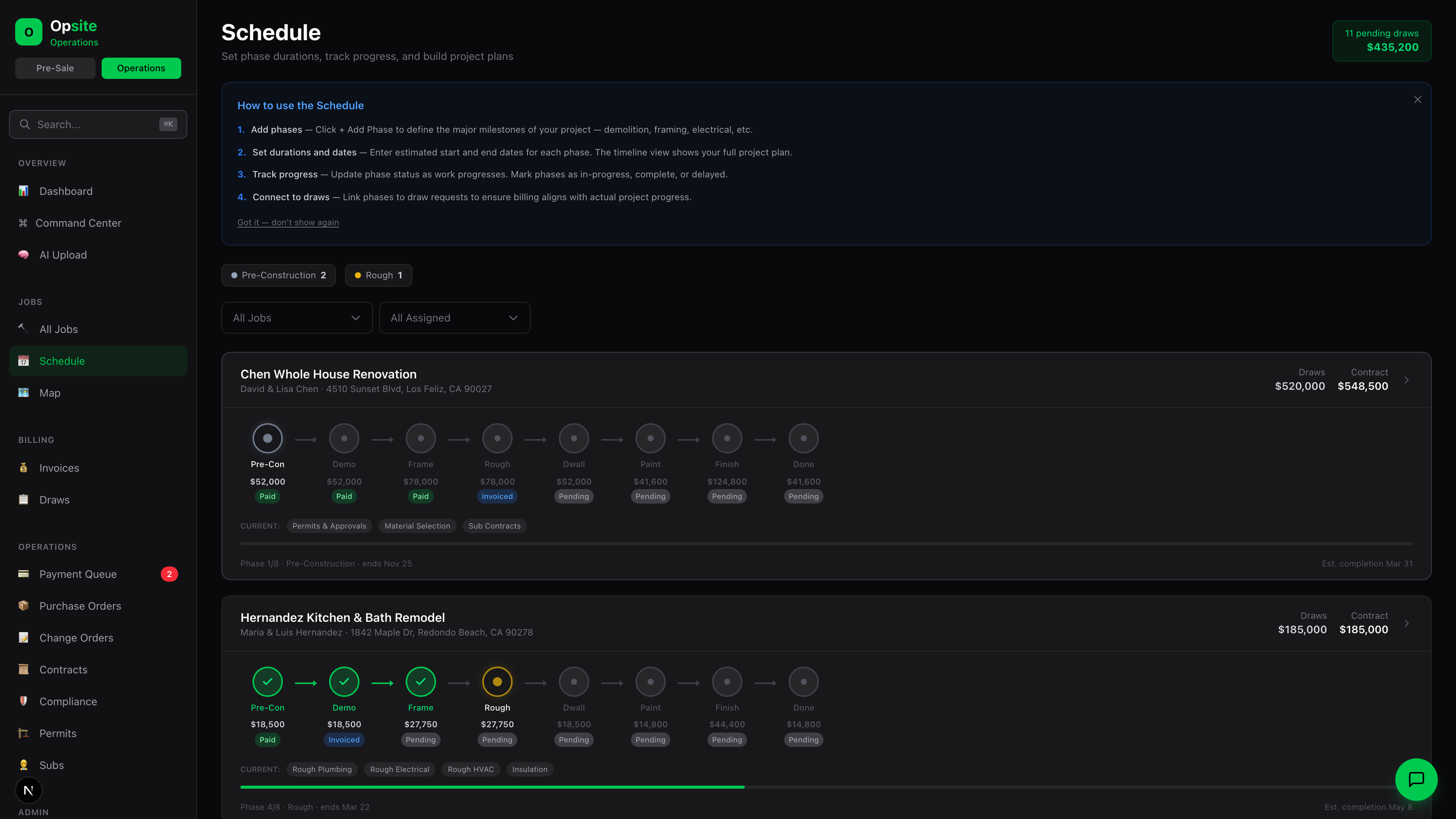
See every job. Every deadline. Every weather alert.

Gantt-style scheduling, a Command Center that shows all jobs at a glance, daily logs with voice-to-AI, and subtask management that connects operations to billing.

  • ✓ Gantt schedule with drag-drop, draw linking, and phase milestones
  • ✓ Command Center — unified view of all jobs with 7-day lookahead
  • ✓ Weather integration — alerts for job sites with rain/wind warnings
  • ✓ Daily logs — voice record, AI structures into log + action items
  • ✓ Photo daily logs — capture site photos with AI captions
  • ✓ Subtasks with materials, triggers, and auto-ordering logic
  • ✓ Inspection management with multi-sub checklists
Opsite schedule and command center

Track inspection work and sub documents.

See inspection and permit status alongside subcontractor documents. Review expiration alerts and confirm how your team evaluates coverage and applies any PO or payment hold.

  • ✓ Multi-sub inspection scheduling with checklist templates
  • ✓ Correction items — track, assign, and verify fixes
  • ✓ Inspection-to-draw linking — pass triggers invoice automation
  • ✓ Permit tracking with status management
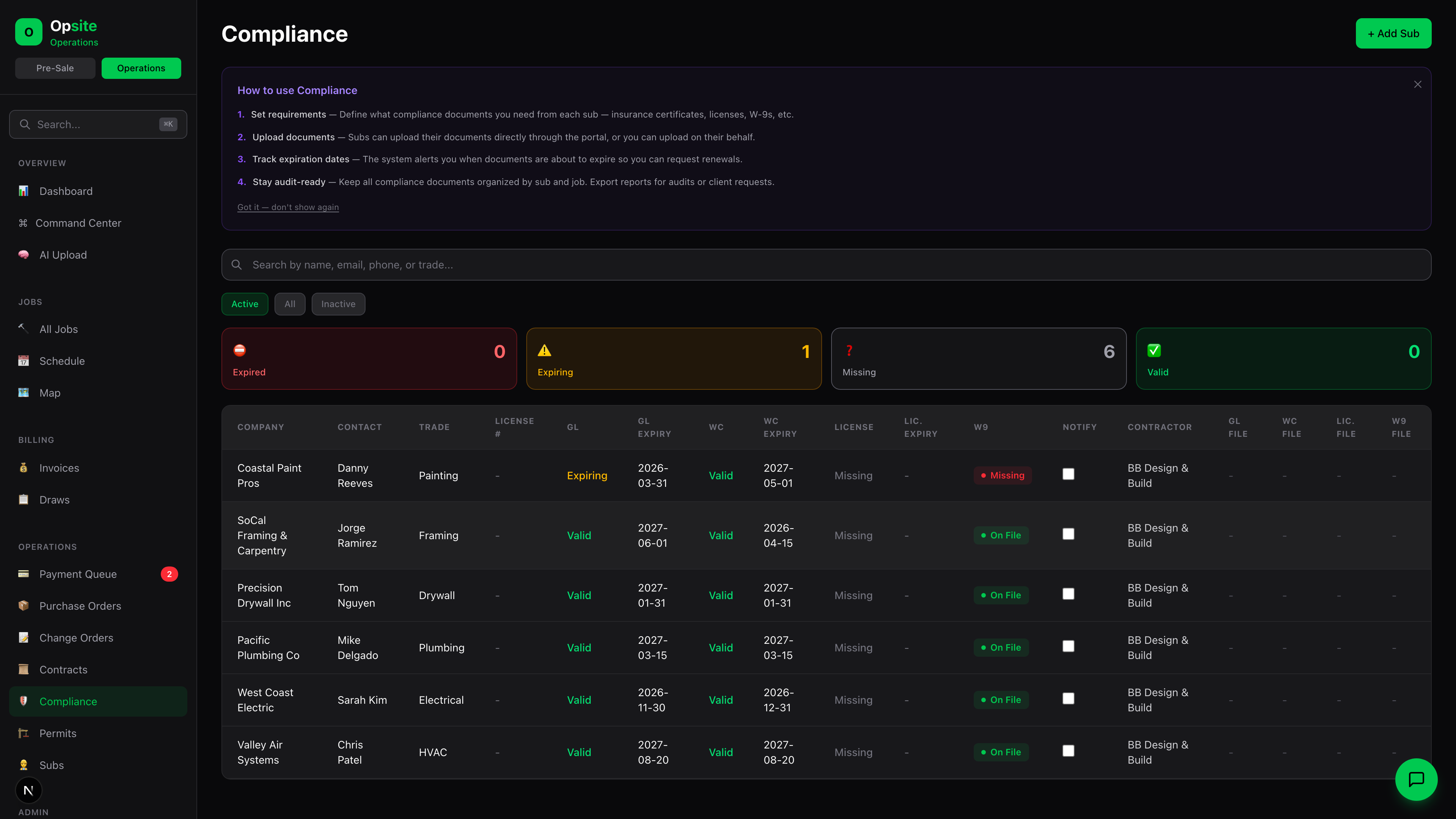
  • ✓ Compliance Hub — GL, WC, License, W9 per sub
  • ✓ Auto-reminders for expiring documents (30, 14, 7 days)
  • ✓ Review PO and payment holds against your documented requirements
  • ✓ Company-level compliance document management
Opsite compliance hub

Zero-login portals. For subs who won't download an app.

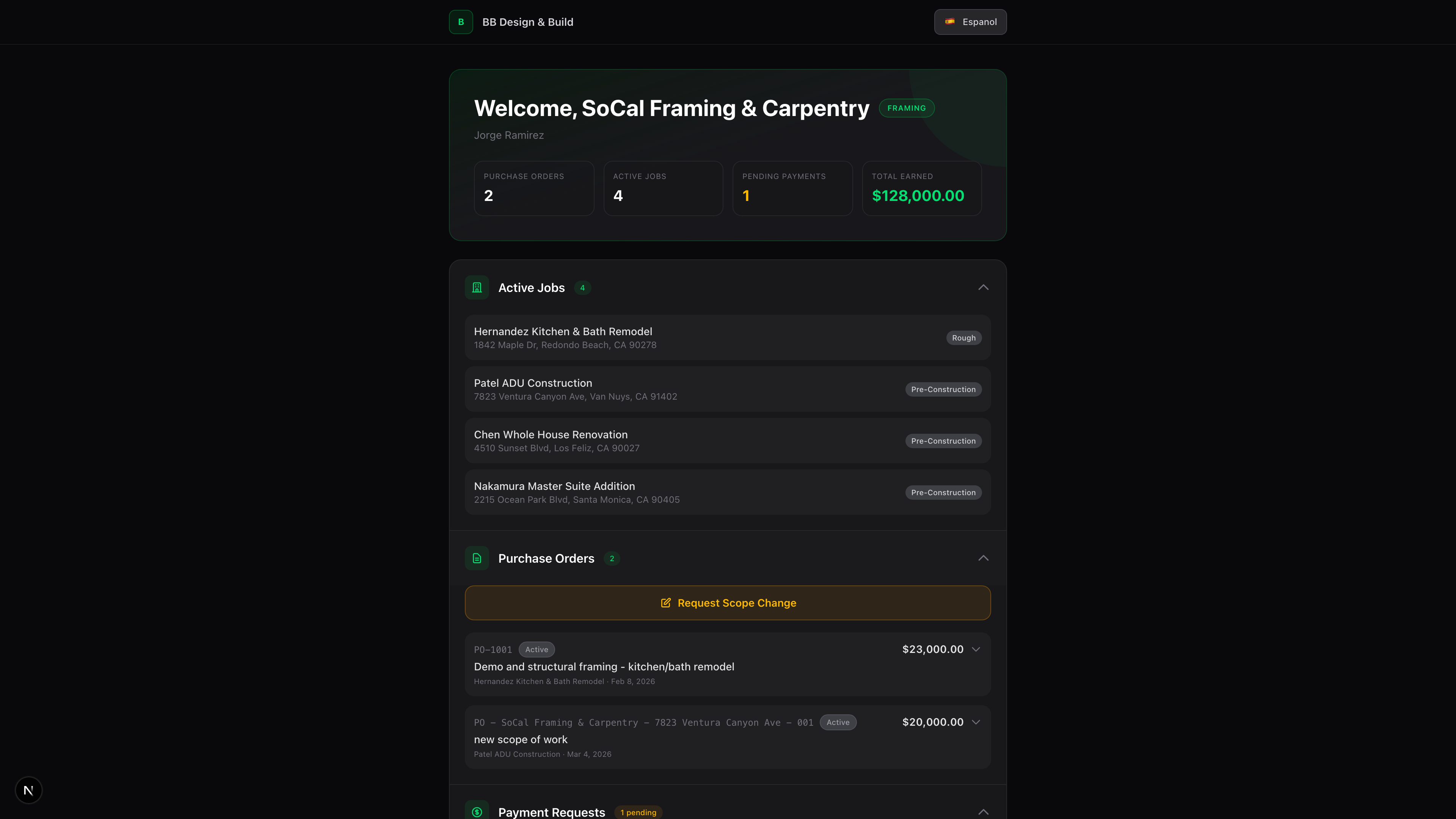
Your subs won't download another app. Your clients want updates without calling you. Opsite portals work via a link — no login, no password, no app store. Available in English and Spanish.

  • ✓ Sub Portal — view POs, request payments, upload compliance docs
  • ✓ Bilingual: full English and Spanish support
  • ✓ Zero-login — unique link per sub, works on any device
  • ✓ Sub daily logs — voice and photo logs from the portal
  • ✓ Client Portal — project progress, CO approval, financials
  • ✓ Material selection portal — 9-phase system for remodel clients
  • ✓ E-signatures on POs, change orders, and contracts
  • ✓ Branded portal pages with your company identity
Opsite sub portal

AI for the contractor workflows you can verify

Professional lists Lino, Opsite's in-product assistant for questions about connected records. Enterprise lists AI agents and custom automation. Ask to see the source record, permissions, approval step, and resulting history for your task.

Lino AI Assistant

Ask Lino questions about connected job and financial records in plain English. The records it can retrieve depend on your account and permissions; test a question against a sample job.

  • ✓ "What's the profit margin on the Oak Street job?"
  • ✓ "Which subs have expiring insurance this month?"
  • ✓ "Show me all unpaid invoices over 30 days"
  • ✓ "How much did we spend on plumbing across all jobs?"
  • ✓ Train with custom knowledge via the Brain feature

AI Agents

Enterprise lists agent workflows. Confirm which triggers, messages, approvals, and pause controls are available for your account before enabling a client-facing or financial action.

  • ✓ Collections Agent — rules-based reminders for overdue invoices
  • ✓ Inspection Agent — reminders before scheduled inspections
  • ✓ Lead Nurture Agent — automated follow-ups for cold leads
  • ✓ Compliance Agent — alerts on expiring sub documents
  • ✓ Audit Agent — flags financial anomalies and discrepancies

See the Collections Agent settings and a practical demo checklist →

Workflow tests for your demo

These are evaluation scenarios, not evidence that every action runs unattended. Ask to see the source record, trigger, reviewer, resulting history, and plan requirement for each one.

Inspection PASSED
↓
Check the proposed invoice, PDF, approval, and send record
Lead Submitted
↓
Check the lead record, scoring basis, and follow-up owner
PO Fully Paid
↓
Check payment status and document review before closing the PO
Change Order Approved
↓
Trace approved scope into draws, budget, and sub instructions
Compliance Expiring
↓
Check the alert, replacement document, and hold decision
Proposal Won
↓
Check the new job, tasks, schedule, and owner review

Test your workflow with Opsite

Connects to your existing tools

Opsite integrates with the tools you already use — no data silos, no double entry.

📚

QuickBooks

Sync invoices, bills, and payments. Create in Opsite, it appears in QuickBooks. Zero double-entry.

📍

Google Maps

Address autocomplete and location lookup for jobs, leads, and contacts.

🌤

Weather

Real-time weather for job sites. Rain alerts, wind warnings, and 7-day forecast in the Command Center.

📧

Email

Automated email notifications, invoice delivery, compliance reminders, and lead follow-ups.

What is Opsite?

Opsite is a construction management platform for small-to-mid-size general contractors. It combines job management, invoicing, sub portals, CRM, proposals, scheduling, and compliance tracking. Professional adds the in-product Lino assistant; Enterprise lists AI agents and custom automation. Published plans start at $349/month with no per-user fees and no annual contracts.

Test your contractor workflow

Bring a sample job, invoice, or change order. We’ll show the records and approval steps behind the workflow.

Request a workflow review →