Give an AI agent the job context. Keep the decision.
Opsite connects contractor records to an in-product assistant and, on Enterprise, an external MCP/API path. The useful question is what an agent can do on your jobs, under your permissions, with a result your team can verify.
What is a construction AI agent?
An AI agent uses connected tools to read job records or perform a defined task. For a GC, the value is in the chain: correct job → source record → draft or action → human review where needed → audit trail. A chatbot answer without that chain is not a completed workflow.
Start with a read-only question, such as which approved draw remains unpaid. Then test a draft client update or reminder. Confirm the source records and recipient before allowing anything to be sent. A polished response can still refer to the wrong job or an outdated invoice.
Two ways to use Opsite AI
Lino in the app
Ask questions about connected Opsite records while working inside the product. The Professional plan lists Lino. Test what it can retrieve on your own sample job.
AI agents and automations
Enterprise lists agent workflows and custom automation rules. Ask to see a real trigger, any approval step, the resulting record, and how to pause a workflow.
External MCP/API connection
Enterprise also lists API access. Opsite has a hosted MCP endpoint for compatible clients. Authentication and available tools depend on your account, scopes, and client; verify them before granting write access.
These are different capabilities. Buying an AI assistant does not automatically mean an outside agent can perform every action. Check the current plan and ask for the specific task you want demonstrated.
Separate the AI question from the reminder rule
Bring a sample invoice with a due date, partial-payment case, and a disputed case. Lino is the AI assistant; the scheduled Collections Agent follows configured rules rather than generating collection decisions. Ask the team to run the same sequence in a test account:
- Ask Lino, then verify. Have Lino identify the job, client, invoice, amount, due date, and current payment status. Open the source record to check its answer.
- Review the proposed action. Ask for a reminder draft and recipient preview. Check what happens if the invoice is disputed or payment arrives before sending.
- Check control and history. Show who can approve, pause, or send; then locate the resulting event or audit record.
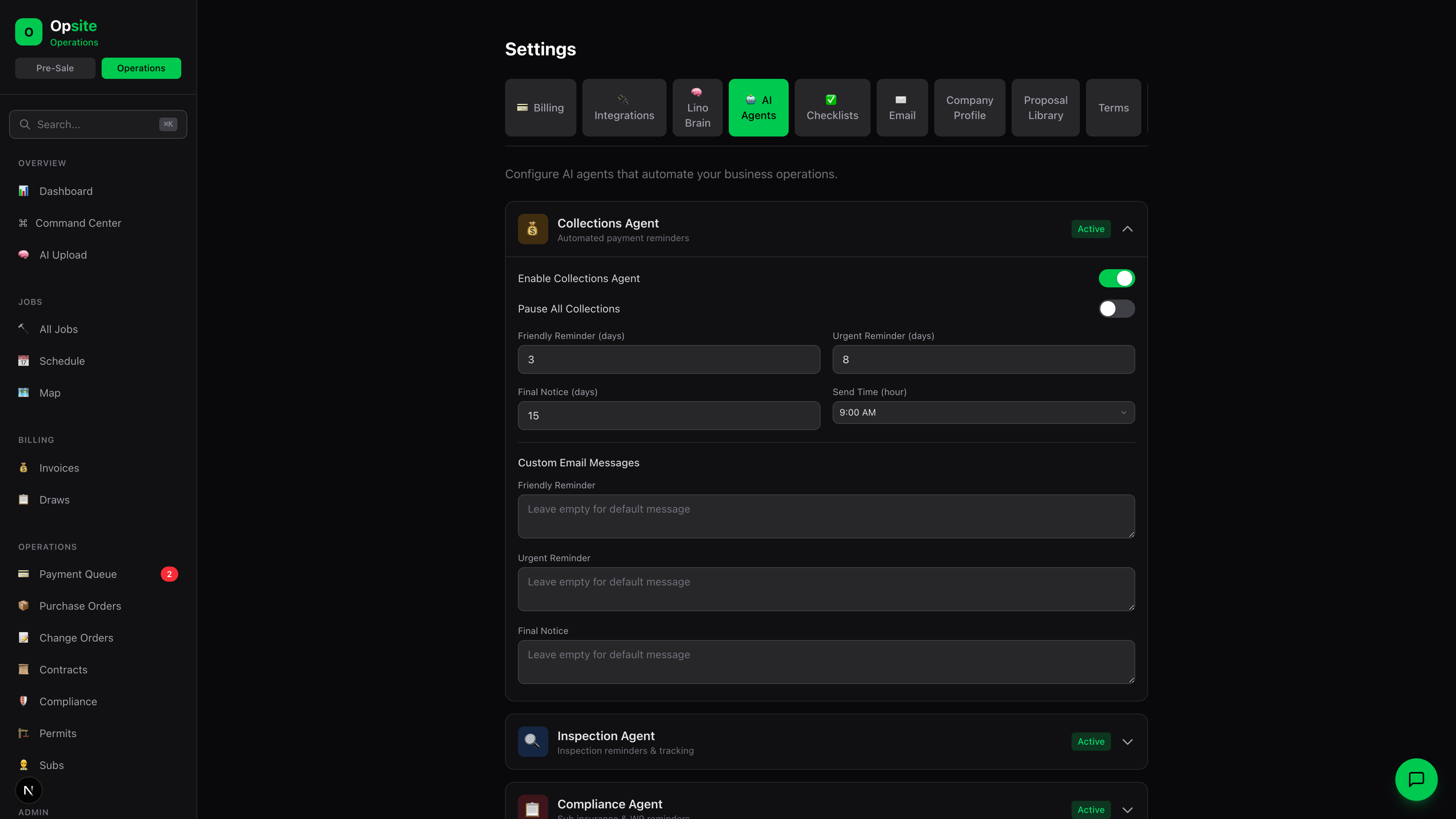
What this screen can and cannot prove
It shows controls for enabling or pausing reminders, intervals, send time, and message content. The demo still needs to show the actual invoice, recipient preview, whether approval exists, send record, and paid-state handling.
Plan check: the rules-based Collections Agent is listed with Enterprise automations. Lino on Professional is a separate AI assistant.
Connecting an outside AI client
Opsite’s hosted MCP endpoint is https://app.useopsite.com/api/mcp. Its tool catalog is filtered by the authenticated credential’s scopes. That is a useful control, but scope enforcement alone does not decide whether an agent’s output is correct or whether a client-facing action should be approved.
For Claude Desktop, use Anthropic’s current remote-connector instructions. Confirm Opsite’s current authentication flow and your organization’s connector policy before adding the URL. Start with a read-only credential and a sample job. Do not paste keys into a chat or grant broad write permissions just to see whether the connection works.
For a custom agent, verify the same record access, tool scopes, failure behavior, and audit trail. Ask for a live demo of the exact client you plan to use; compatibility cannot be inferred solely from a shared protocol label.
Questions to ask before giving an agent access
- Which jobs and records can this user or credential see?
- Which tools only read, and which create, change, or send?
- Where does a person approve a client message or financial action?
- Can every answer point to a dated source record?
- How do you revoke access and inspect past tool calls?
- What happens when a tool fails or a record changes mid-run?
Use the same sample job and checklist across vendors. The AI contractor software buying guide compares platforms by the work a GC needs them to finish, with current vendor sources.
Frequently asked questions
What is an AI agent for a general contractor?
An AI agent uses connected tools to read job records or perform a defined task. Check source records, access permissions, approval steps, and the audit trail before trusting client-facing or financial actions.
Is Lino the same as an external MCP agent?
No. Lino is Opsite’s in-product assistant on Professional. The external MCP/API path and AI agents are listed on Enterprise. Check current plan details and the tools available to your account.
Can I connect Claude to Opsite?
Opsite has a hosted MCP endpoint. Confirm current authentication, plan access, and tool permissions with Opsite; follow Claude’s remote connector instructions and begin with a read-only test.
Should an agent send invoices or client updates automatically?
Do not assume so. Test the exact action on a sample job, review the recipient and source records, and require an appropriate human approval step before enabling automated sends.
Put one of your workflows under the microscope.
Tell us what kind of projects you run and the task you want AI to handle. We’ll show the relevant Opsite workflow and where human review belongs.
Request a contractor workflow review →